If no **Due date** is selected, the system will display all unpaid invoices. Usually, payment reminders should be sent only for overdue invoices.
4\. Select the customers for whom you want to send payment reminders. 5\. Click **Send payment reminders**. [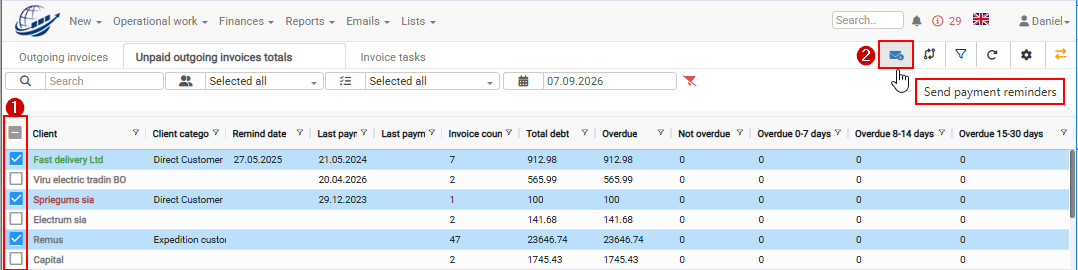](https://help.cloudex.app/uploads/images/gallery/2026-09/Bwgimage.png) 6\. In the reminder window, select the required payment reminder text. 7\. If needed, select **Attach unpaid invoices as PDFs**. 8\. Send the payment reminders. [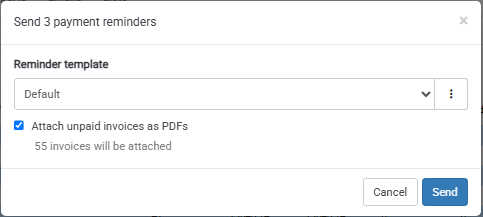](https://help.cloudex.app/uploads/images/gallery/2026-09/1G8image.png)If **Attach unpaid invoices as PDFs** is selected, the unpaid invoices will be added to the reminder email as separate PDF attachments.
##### **Where will the payment reminder be sent?** CLOUDEX TMS sends the payment reminder using this order: 1. To the customer’s **Reminder email**. 2. If the **Reminder email** is empty, to the customer’s **Invoice email**. 3. If both fields are empty, the reminder is sent to the manager responsible for the order included in the [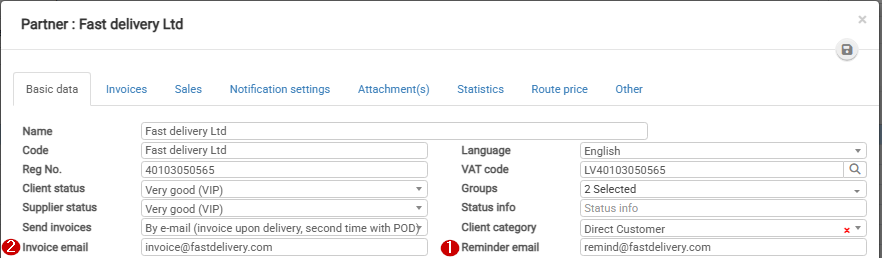](https://help.cloudex.app/uploads/images/gallery/2026-09/2jOimage.png) ##### **Common mistakes** - No **Due date** is selected, so all unpaid invoices are shown. - The wrong customer is selected. - The customer’s **Reminder email** is empty. - The invoice is unpaid in CLOUDEX TMS, but it has already been paid outside the system. - Unpaid invoice PDFs are not attached when the customer needs invoice copies.