
How to add a carrier TMS API key?
AddIna order to register carrierscarrier's TMS system API key gowhen Cloudex TMS needs to send transport orders or other information directly to the carrier's external TMS.
YourFor profileexample, -if your carrier uses XSPED or Terminality, their API credentials must be registered in Cloudex TMS before you can send orders to their system via API.
Note: This is not a Cloudex API key.
Here you enter API credentials provided by the carrier or their TMS provider.
When do you need this?
You need to add carrier TMS credentials when:
If the carrier also uses Cloudex TMS, you normally do not need to enter an external API key. Cloudex recognizes the Cloudex-to-Cloudex connection automatically.
Before you start
Ask the carrier or their TMS provider for the API credentials required for the integration.
You will also need to know which carrier in your Partners list the credentials belong to.
How to add the carrier TMS API key
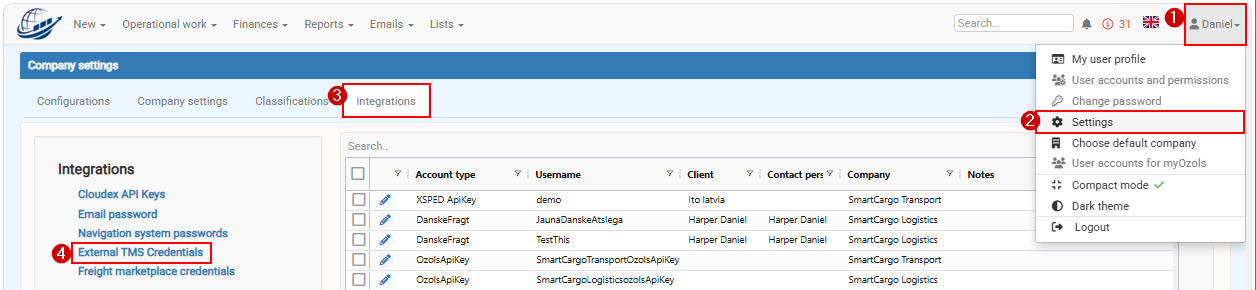
Go to: My Profile → Settings -→ Integrations -→ External TMS credentials
Click add
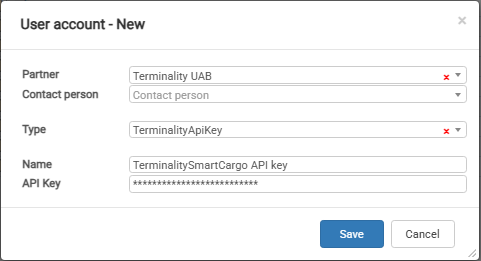
Inprovided typeby fieldthe choosecarrier Carriersor their TMS system
APIThe keycredentials enterare Carriersnow APIlinked keyto that carrier.
What happens after the API key is added?
When you select this carrier in Trip/Spedition, Cloudex TMS can recognize that an external TMS integration is configured.
If the integration supports sending transport orders, the Send order to carrier function becomes available.
You can then send the transport order directly from Cloudex TMS to the carrier's TMS without manually entering the same order in another system.
Cloudex API key vs. External TMS credentials
These two settings are used for opposite integration directions:
Use Cloudex API keys when another system needs access to Cloudex TMS.
Use External TMS credentials when Cloudex TMS needs access to another TMS.