
How to add GPS coordinates to a client order address?
1.
Use Howthis instruction when the loading or delivery address in a client order does not have correct GPS coordinates or the location needs to obtainingbe GPSadjusted data for a customer order
Press manually. . This will open the additional form for adjustments.
EditOpenbuttonthe required Client order.EditGetoptionGPS - if address is found then GPS coordinates will be automatically set
In order to opencheck Addressor formadjust the GPS coordinates
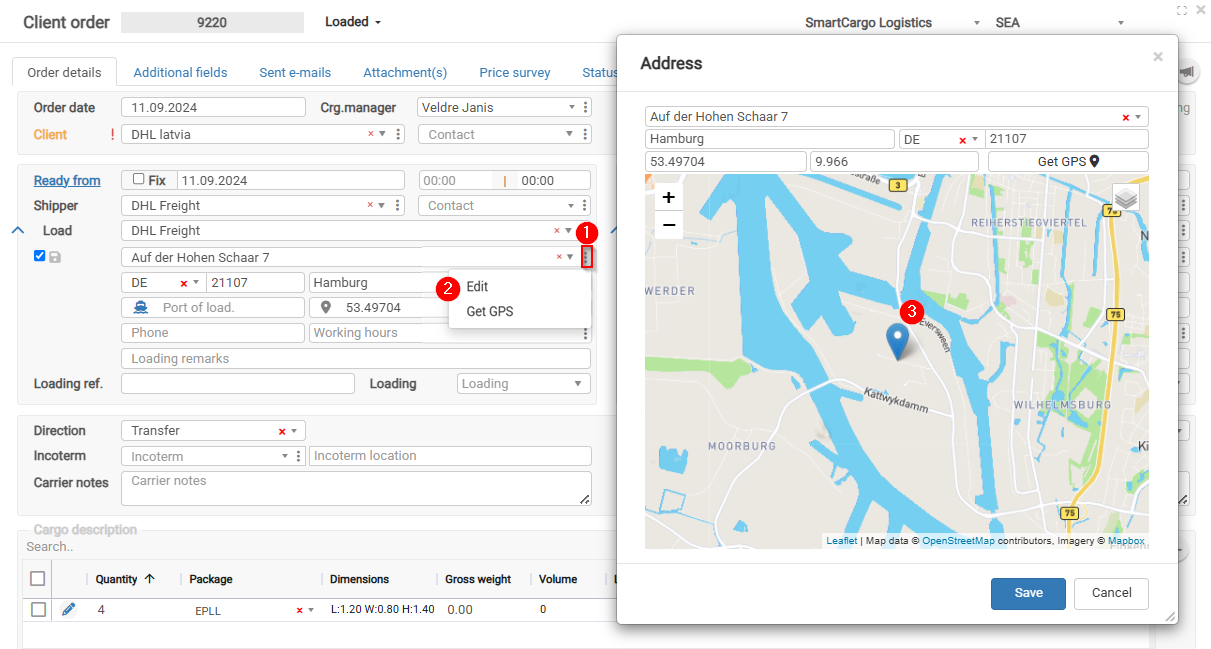
Correct GPS coordinates are needed for map display, route planning, trip tracking, and automatic status updates.
If the route is not shown correctly on the map, check whether the loading and delivery addresses have correct GPS coordinates.
2.
Benefits of Obtaining GPS Coordinates
1. Benefits of Obtaining GPS Coordinates
Filling in the GPS coordinates field in logistics and transport systems provides several advantages that improve operational efficiency, transparency, and accuracy. Here are the main benefits of completing the GPS coordinates field:
2. Planning Accuracy
Precise locations can be viewed on the map, making logistics planning and route optimization easier.
3. Trip Route Tracking
The route is visible on the map in real time, helping monitor transport flow and ensuring that the vehicle follows the planned route.
4. Accurate Location Identification
GPS coordinates allow precise identification of the location where the driver must arrive, reducing misunderstandings and increasing delivery accuracy.
5. Automatic Time Recording
The system automatically records the time when the vehicle arrives at and leaves the loading/delivery address, helping improve operational tracking and analysis.
6. Cargo Status Tracking
Time and location data are integrated into cargo statuses, providing a complete overview of cargo movement and delivery status.
7. Automatic Status Changes
The system automatically changes the trip status when the vehicle approaches the loading or delivery address, speeding up the process and reducing manual actions.
8. Downtime Monitoring
GPS data makes it possible to track how long the vehicle stays at the loading or delivery address, helping identify and reduce unproductive downtime.
9. Driver Activity Monitoring
The system can verify whether the driver marks the cargo as loaded or delivered at the specified address by comparing it with the driver’s actual location data.
10. Route Comparison
It is possible to compare the driver’s planned route with the actual route traveled, helping identify deviations and opportunities for route optimization.
11. Customer Portal Functionality
Customers can view the vehicle’s current location and route to the loading/delivery address in the portal, improving transparency and customer satisfaction.12.
These benefits help optimize logistics processes, improve delivery accuracy and efficiency, and provide greater transparency and customer satisfaction.