
How to create API Key
When should I create a Cloudex API key?
IfCreate somea ofCloudex yourAPI partnerkey companieswhen wantanother system needs to integrateexchange data with your systemCloudex inTMS orderaccount through the Cloudex API.
For example, an API integration can be used to:
shipmentsshipments/orders intoCLOUDEXCloudex TMS fromtheiranothersystemsystem.GetRetrievebackshipmentstatuses/milestonesstatuses and milestones.- Download documents
likesuchPOD/CMRas PODs or CMRs. ImportExportOutgoingoutgoing invoicesintotoyouranbookkeepingaccountingsystemsystem.ImportExportIncomimingincoming invoicesintotoyouranbookkeepingaccountingsystemsystem.Get actualRetrieve debtorlistinformation forsomeacreditcredit-managementcompanysystem.
Cloudex API Keys are used when an external system connects to Cloudex TMS.
If Cloudex TMS needs to connect to another TMS, use External TMS Credentials instead.
What should I know before creating an API key?
An API key is a security credential that allows another system to access Cloudex TMS through the API.
Only create an API key for a trusted integration partner or system, and share it only with the intended recipient.
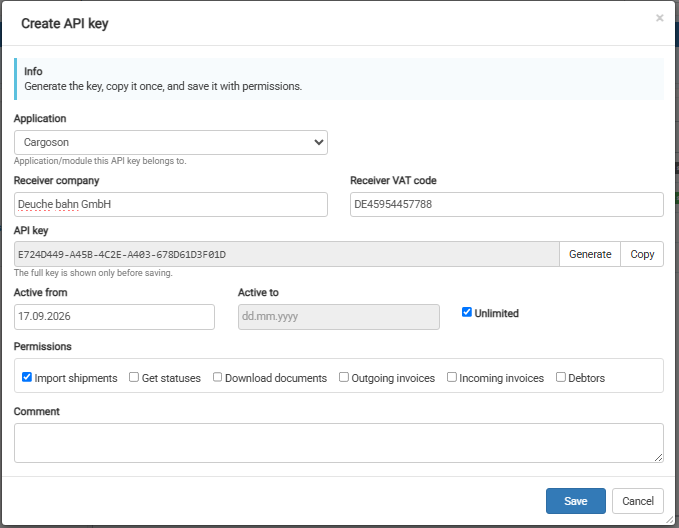
IMPORTANT: Copy the API key before saving it.
After the API key has been saved, the key itself will no longer be visible in Cloudex TMS.
How todo I create a Cloudex API key?
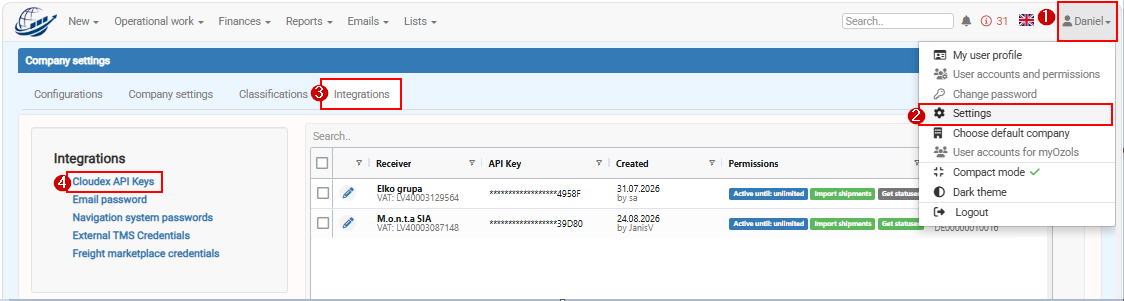
Go to: MyYour Profilename -→ Settings -→ Integrations -→ Cloudex API keys
Click + New API key
Your integration partner can now use the API key to authenticate requests to the Cloudex API.
What if I forgot to copy the API key?
IMPORTANT:For beforesecurity youreasons, savethe API key is not displayed again after it has been saved.
Therefore, always copy the key Copybefore clicking Save.
Security recommendations
Treat an API key like a password.
Do not include API keys in screenshots, help documentation, public messages, or other places where unauthorized users could access them.
If an API key should no longer be used, it otherwise it later will notshould be visibledisabled or removed from Cloudex TMS.
Send Api Key to you partner