
How to delete duplicate or unused partners
Purpose
Use this guide when you need to delete an unused partner or remove a duplicate partner in CLOUDEX TMS.
This article explains:
- when a partner can be deleted immediately;
- when partner data must be moved to another duplicate partner before deletion;
- why the replacement partner must have the same VAT code or registration number;
- what to do if no replacement partner is available in the selection list.
If partner is only used as Sender, Consignee or Loading/Delivery company then open partner and press button Delete
If Partner is used as client/customer, carrier/suppliers then it is possible to delete duplicate partners only if they have the same VAT or Registration numbers.
Open: Lists → Partners → All partners
Use the search field to search by: partner name; VAT code; registration number; ...
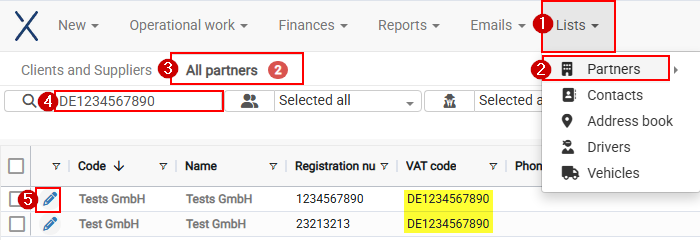
Open one of 2 duplicate partners (5)
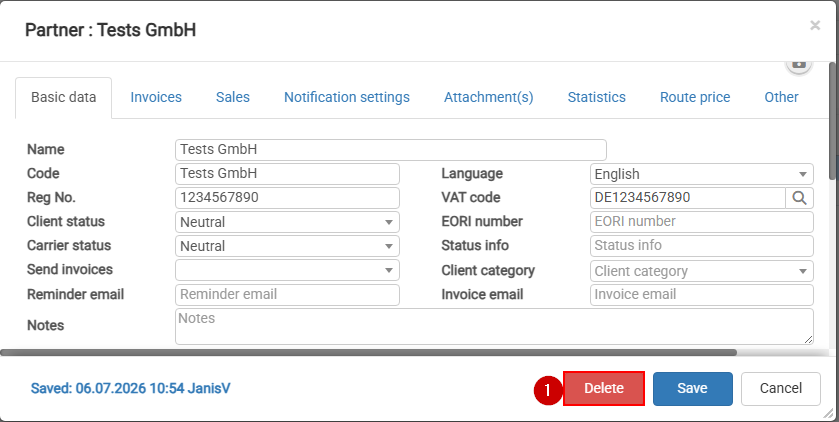
Press Delete button
If partner is used in some tables then will appear window where you will be able to choose duplicate Partner with the same VAT or registration number
Select the duplicate partner that will receive the data, then click Replace and delete.
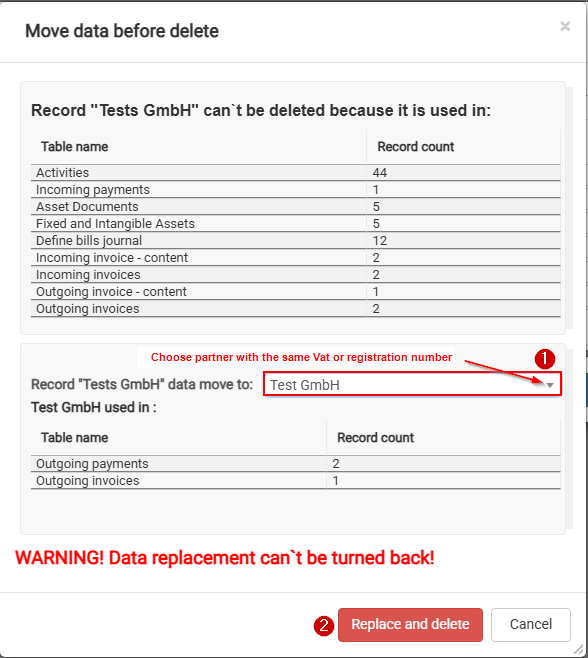
If you can't choose partner to which move data, then first to duplicate Partner enter the same VAT or registration number
After clicking "Replace and delete":
- data from the deleted partner is moved to the selected replacement partner;
- the duplicate partner is deleted;
- historical records remain connected to the correct partner.