
How to record a customer self-billing invoice?
IfUse this function when your customer isuses making creditnotes/self-billing then— meaning that the customer creates the invoice for your services on your behalf.
In Cloudex TMS, you needshould issuestill invoicescreate the sameOutgoing invoice as forusual anyso otherthat customer,the butrevenue, needcustomer debt and related Client orders are correctly recorded in the system.
Additionally, Cloudex TMS allows you to save alsothe invoice number assigned by the customer in the Self-billing No field.
This is especially useful when the customer later makes a payment using their self-billing invoice number.number inas orderthe payment reference.
1. How to doenable itself-billing infor a customer?
You only need to configure this once for each customer formthat uses self-billing.
Go to: Partners → Open the customer → Invoices
After this setting is enabled, the Self-billing No field will become available on outgoing invoices created for this customer.
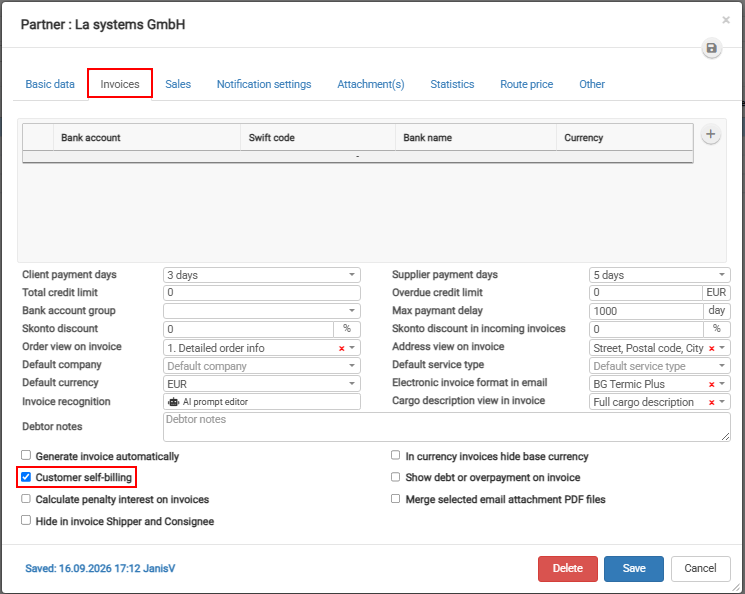
If
2. checkboxHow "Customerto enter the customer's self-billing"billing isinvoice checkednumber?
Create the customer's Outgoing invoice in thisCloudex customersTMS Outgoingas invoiceusual.
On bethe availableoutgoing Fieldinvoice:
Example
Cloudex TMS outgoing invoice number: INV-2026-01584
Customer's self-billing invoice number: SB-45879
Enter SB-45879 in the Self-billing No field.
The Cloudex TMS invoice number remains unchanged.

Why is the Self-billing No important?
Customers that use self-billing may use their own invoice number when making a payment.
Saving this number in Cloudex TMS makes it easier to identify which outgoing invoice the received payment belongs to and helps with automatic or manual payment matching.