
How to send an order to a carrier via API?
You can send a transport order directly from Cloudex TMS to your carrier's TMS without sending the order manually by email or entering it again in another system.
This option is available when an API integration with the selected carrier's TMS has been configured.
How to send an order to the carrier
- Open the required Trip/Spedition.
- Select the Carrier.
- If an API integration with this carrier is available, the Send to carrier icon appears next to the Carrier field.
- Click the icon.
- The transport order is sent electronically to the carrier's TMS.
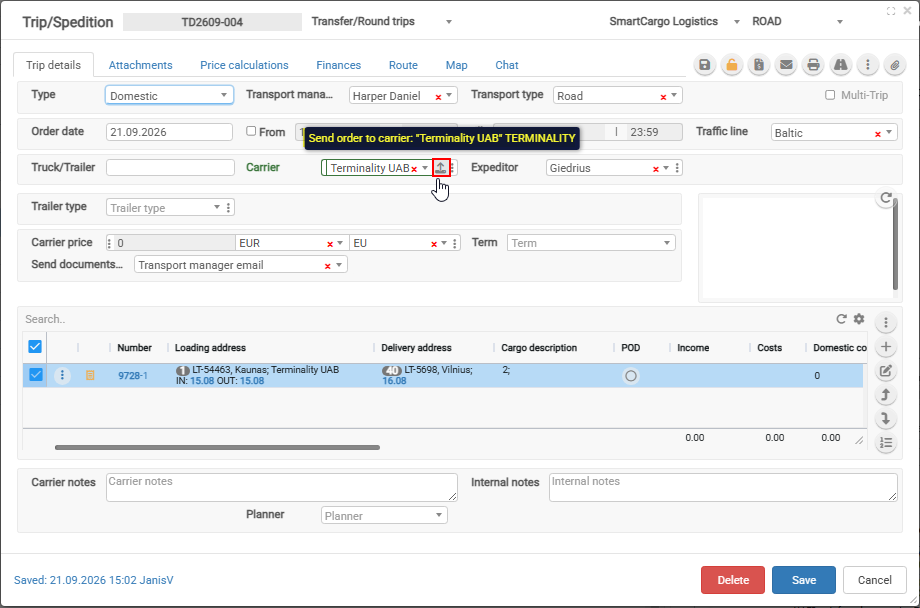
When does the API button appear?
Carrier uses Cloudex TMS
If the selected carrier also uses Cloudex TMS, the API connection is recognized automatically and the button appears without any additional API configuration.
Carrier uses another supported TMS
If the carrier uses another supported TMS, the carrier's API integration must first be configured in Cloudex TMS.
See: How to add carrier API key?
After the integration has been configured, the API button becomes available when that carrier is selected in Trip/Spedition.
Supported carrier TMS integrations
Currently, transport orders can be sent directly to carriers using:
- Cloudex/Ozols TMS
- XSPED
- Terminality
To which systems you can send Orders to carriers. If your carrier is using:
- Cloudex
- XSPED
- Terminality
- Danske Fragtmænd
Sending the order via API helps to:
- avoid manual order entry in the carrier's system;
- reduce data-entry mistakes;
- send transport information directly from Cloudex TMS;
- enable further API communication, such as receiving shipment statuses and documents back from the carrier.
What happens after the order is sent?
Depending on the carrier integration, Cloudex TMS can also receive information back from the carrier, such as:
- shipment status updates;
- delivery milestones;
- POD/CMR and other shipment documents.
This allows information to move between Cloudex TMS and the carrier's TMS without repeatedly entering the same data manually.
Related topics
- How to add carrier API key?
- How to receive statuses and documents from a carrier via API
- How to receive statuses from a carrier via Carrier Link