Skip to main content
TMS
View All
Search
Shelves
Books
Log in
Info
Content
Books
CLOUDEX Drive
How to use Driver Web App
How to use Driver Web App
1. Open the Link
Open the link you received from your manager via
WhatsApp
.
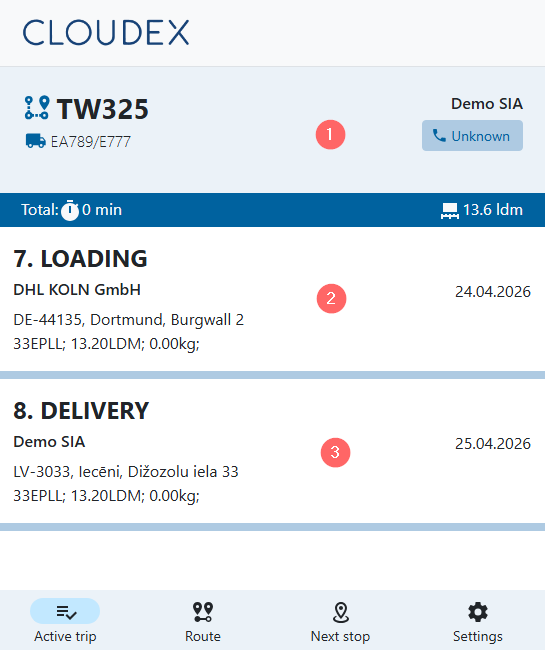
2. Working with an Active Trip
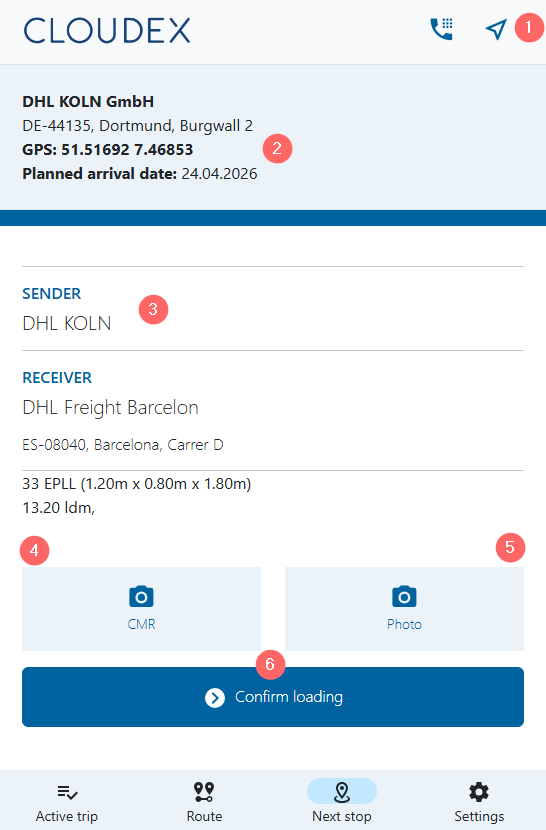
3. Confirming Cargo Loading
Navigation options
Pickup / Loading location
Order information
Add a photo
Upload the
CMR
document
Click
"Confirm Loading"
to confirm that the cargo has been loaded.
Enter section select mode
Previous
How to use "Cloudex Drive"
Next
How to clear Cache & Storage
0 Comment Threads
0 Archived
No comments to display
No comments to display
Back to top


No comments to display
No comments to display