
How to set up gmail e-mail?
1. To send Gmail emails from within OZOLS TMS, follow these steps:
1) Open a Google account and authorize:
2) Opens the Security section
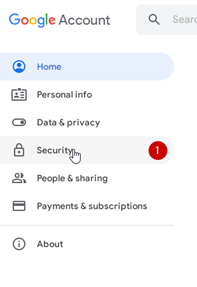
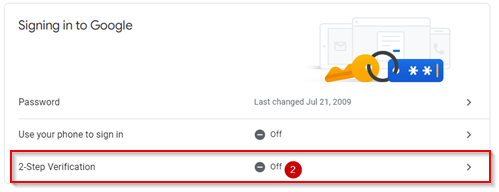
3) Activate two-step authentication (a confirmation code will be sent to the phone)
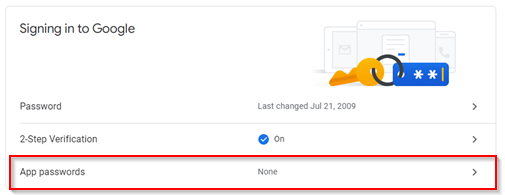
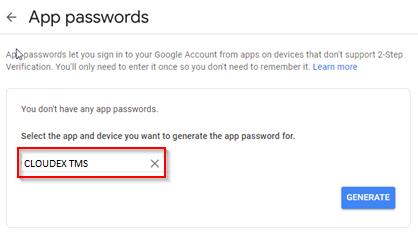
4) Select App passwords
4) Choose Other (Custom name)
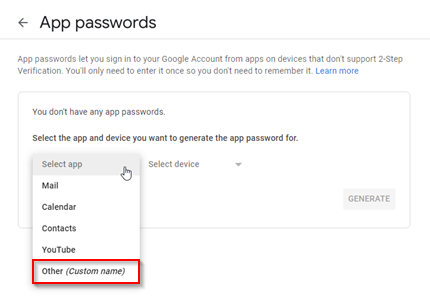
5) Type "Ozols" in the window and press GENERATE
5) A gmail password for the OZOLS TMS system is created
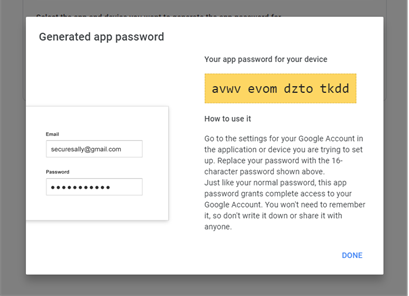
5) This password must be entered in the user's email settings in CLOUDEX TMS by following the instructions here.
No comments to display
No comments to display