
When is the invoice “Date sent” field filled in automatically?
Cloudex TMS fills in the Date sent field automatically when both of the following conditions are met:
- Send by email only is selected.
- The invoice is sent by email from Cloudex TMS.
When the Date sent field contains a date, the invoice status changes automatically to Invoice sent.
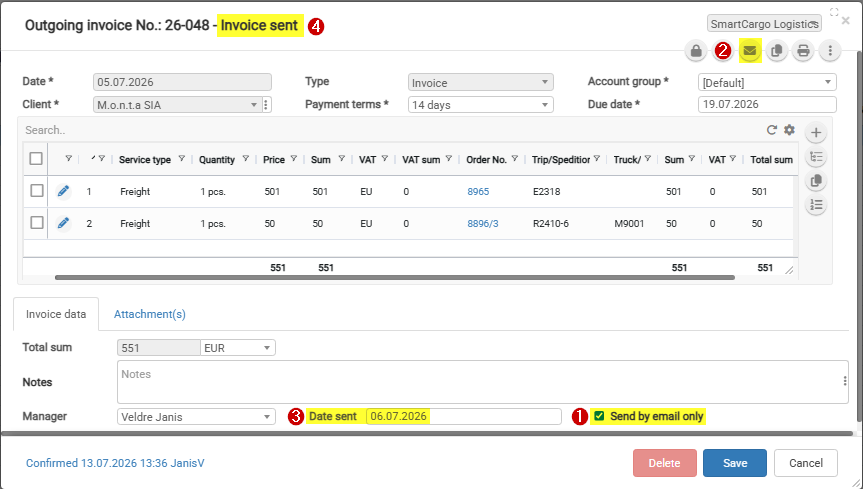
The “Send by email only” checkbox value is set automatically when generating an invoice from an order.
The checkbox value depends on the “Send invoices” field value.
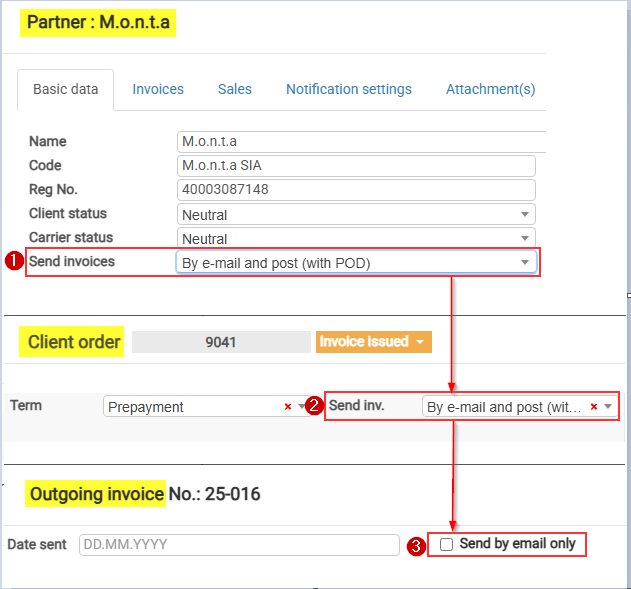
Send invoices values marked with “*” set the “Send by email only” checkbox value automatically:
| Send invoices setting | “Send by email only” selected automatically |
|---|---|
| By e-mail (with POD) | Yes |
| By post (with POD) | No |
| By e-mail and post (with POD) | No |
| Don’t send (Self-billing) | Yes |
| Download in Client Portal | Yes |
| By e-mail (invoice upon delivery, second time with POD) | No |
| By e-mail (without POD) | Yes |
| Upload to the Client Portal together with POD | No |
When should I enter the “Date sent” manually?
Enter the Date sent manually if the invoice was sent outside Cloudex TMS or if the date was not filled in automatically.
For example, manual entry may be required when the invoice was sent directly from Outlook or another email application.
No comments to display
No comments to display