
How to send shipment milestones to Cloudex TMS via API?
Use the Cloudex TMS API milestones endpoint when an external system needs to update Cloudex TMS about the progress of an existing shipment.
Examples include shipment milestone/status updates such as:
- Shipment loaded;
- Shipment delivered.
Before you start
The shipment must already exist in Cloudex TMS and the external system must be able to identify which Cloudex TMS shipment the milestone belongs to.
You also need:
- access to the Cloudex TMS API;
- a valid Cloudex API key.
Full Cloudex TMS API documentation: https://my.cloudex.lv/cloudex-api/swagger/index.html
Which endpoint should be used?
To send shipment milestone/status updates to Cloudex TMS, use the: milestones endpoint.
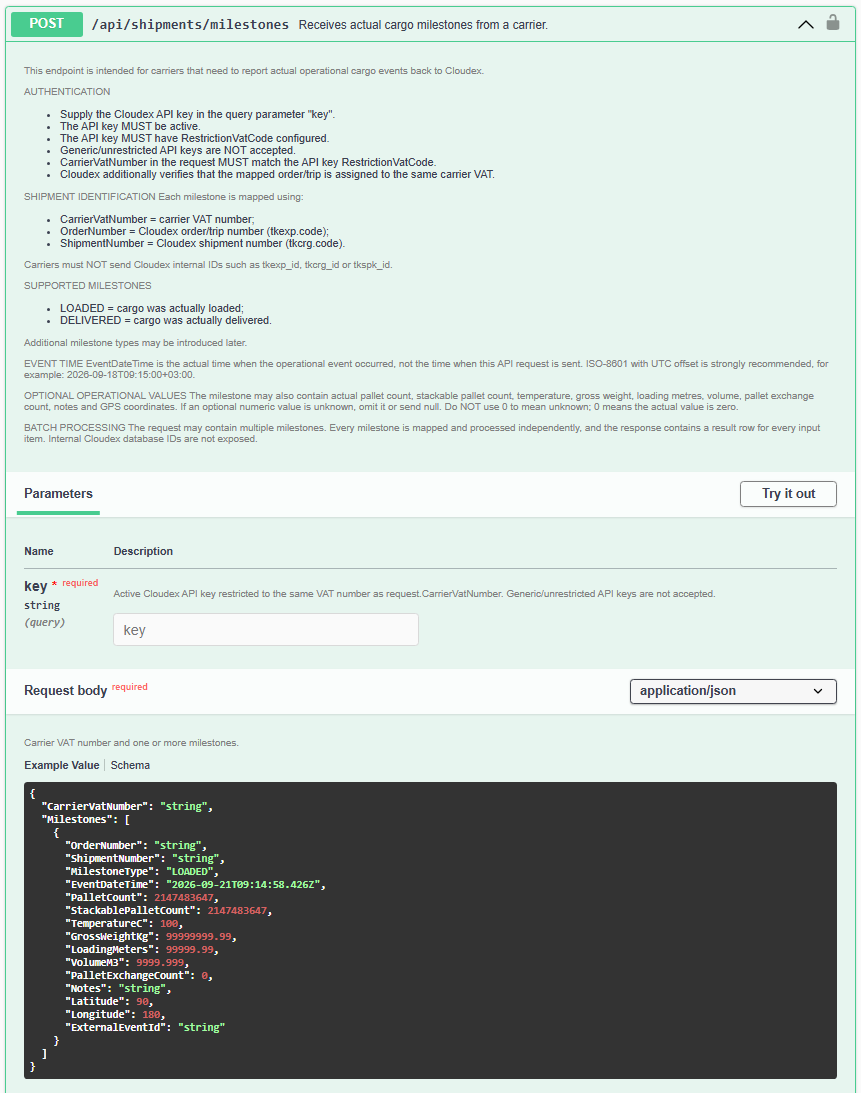
Integration flow
A typical integration works as follows: External system → Shipment milestone/status → Cloudex TMS
For example, when the shipment is marked as delivered in the connected external system, the corresponding milestone can be sent to Cloudex TMS.
This allows Cloudex TMS to keep the shipment status synchronized with the connected system without requiring users to update the shipment manually.
No comments to display
No comments to display